One App for Every Class Your Family Takes
Swim on Tuesday, dance on Thursday, a different club for each child. Sign in once to the free nnerb app and see every schedule, balance and progress update in one place.
One login, every business
If two clubs both have you on nnerb, you do not need two accounts. The app starts on All businesses and shows every household you can access together.
Schedules, participants and messages together
Upcoming sessions, your children and your messages from every connected business show up in the same app, each one labelled with the business it belongs to.
Narrow to one household when you want
Open the filter on the Household screen to look at one household or business at a time, then switch back to All businesses with a tap.
See what is owed and how each child is doing
Check balances and invoices, follow each child’s progress, and keep certificates and forms in the same app.
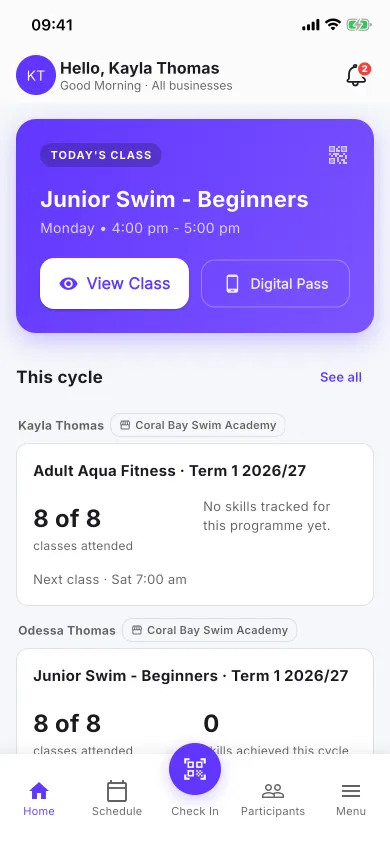
Home: what is coming up for the whole family
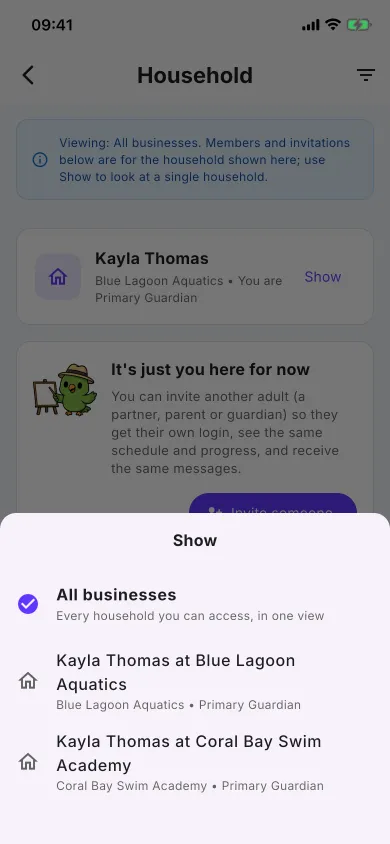
All businesses first, with a filter for each household
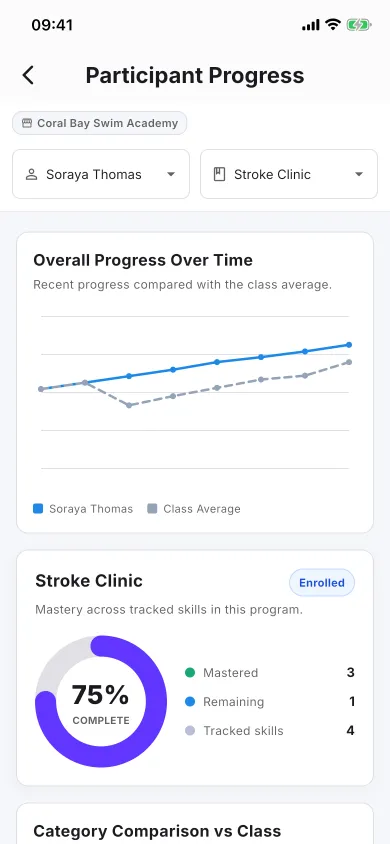
Progress for each child
The same view on the web
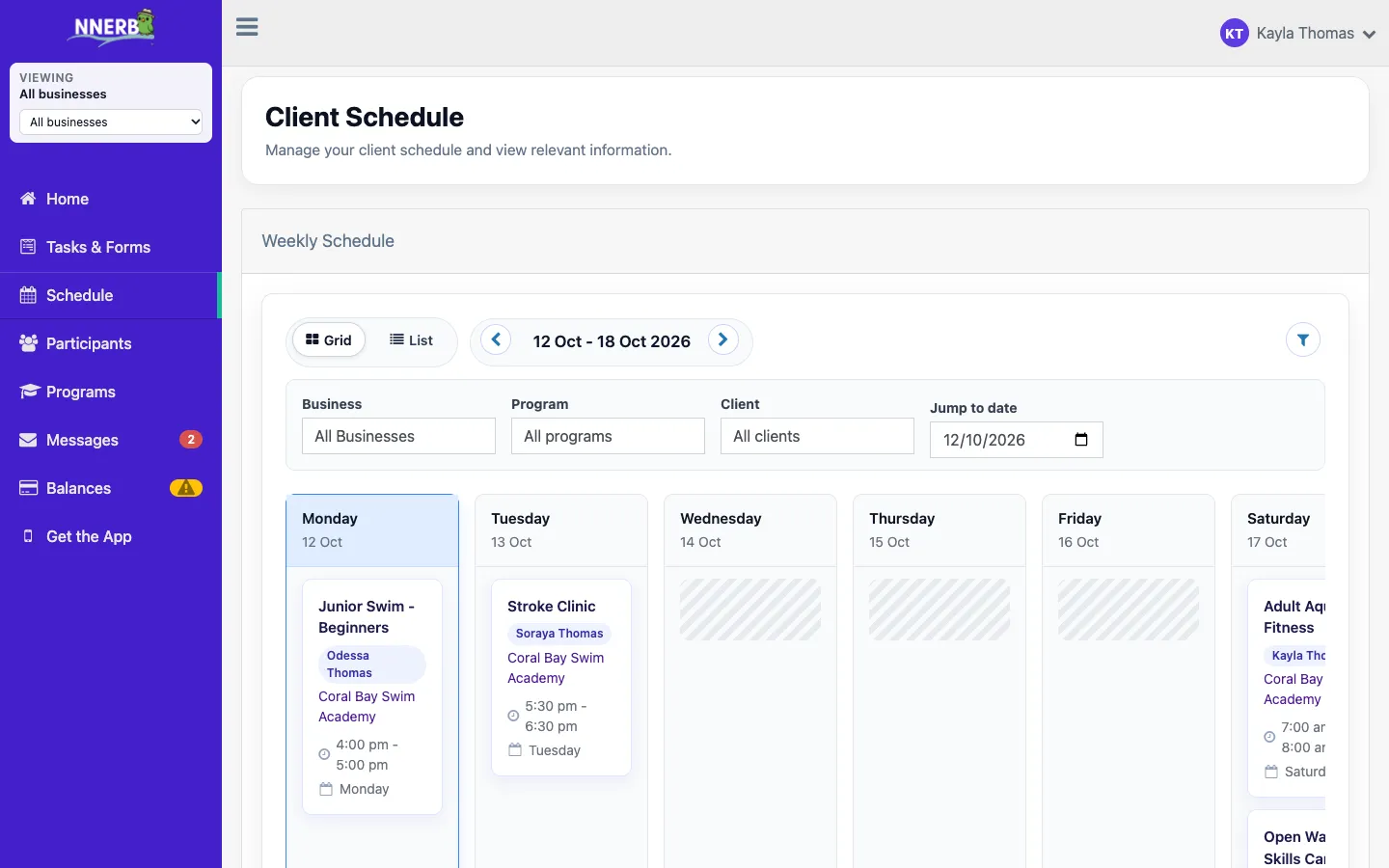
The nnerb website works the same way. Sign in from a browser and the client portal opens on All businesses, with a switcher to narrow it down.
- Same login on the app and the website.
- Sign in with Apple, Google or Microsoft as well as email and password.
- On a business’s own branded web address, the portal shows that business only. On the main nnerb site and in the app you see them all.
Share with another parent or guardian
Give your partner, a grandparent or another guardian their own login instead of sharing yours.
Invite from Household
Open Household in the app menu and invite them by email address.
Send the link your way
The app does not email it for you. It hands you the link in your phone’s own share menu, so you can send it by text message or chat app.
They sign in as themselves
They open the link and accept while signed in as the invited email address. They then see the same schedule and messages. If a link gets lost, choose Share again to get a fresh one.
Made for a phone you use every day
A few small things that make the app easier to live with.
A short welcome
The first time you sign in, a short welcome shows which businesses you are connected to and how to share with another adult. You can skip it, and replay it later from Help in the menu.
Apple, Google or Microsoft
Use your email and password, or sign in with Apple, Google or Microsoft. In the app, Sign in with Apple is available on iPhone and iPad.
Dark mode
Under Settings, choose System, Light or Dark. System follows your phone.
For businesses: your families may already have the app
Many families already use nnerb at another club or school. When you add a family under the same email address they already sign in with, your programs appear in the app alongside their others, under the one login. They do not have to set up another account to follow your schedule.
- No separate app to build or maintain. Families use the same free nnerb client app.
- Send one link. nnerb.com/get-the-app shows the right store button for iPhone and Android.
A family only sees a business once that business has added them. Being on nnerb elsewhere does not link them to your programs on its own.
Questions families ask
Is the nnerb app free for families?
Yes. The nnerb client app is free to download and use, and nnerb does not charge families for it. Any fees for classes are set by the club or school you attend.
Do I need a separate account for each club?
No. One login covers every business that has you on nnerb. Each business adds you by inviting the email address you sign in with, and the app then shows all of them together.
How do I add a business that is missing from my app?
Ask that business to invite the email address you signed in with. Joining nnerb on its own does not link you to a business, because the business has to add you.
Can I narrow the app to one child or one business?
Yes. The app starts on All businesses. Use the filter on the Household screen to show one household at a time, and switch back to All businesses whenever you like.
How do I give my partner or another guardian their own login?
Open Household in the app menu and invite them. The invite is not emailed for you: the app hands you a link to send through your phone's own share menu, such as a text message or chat app. They open it and sign in as the invited email address.
How can I sign in?
With your email and password, or with Apple, Google or Microsoft. In the app, Sign in with Apple is available on iPhone and iPad.
Does the app have a dark mode?
Yes. In Settings, choose System, Light or Dark.
What changes on a business's own branded website?
On a business's own branded web address, the web portal shows that business only. On the main nnerb site and in the app, you see every business you are connected to.
Get every class in one place
Download the free nnerb client app and sign in with the email your clubs have on file.
Get the app