How Caribbean Class Businesses Can Take Card Payments Online: WiPay vs Fygaro vs Stripe vs PayPal
If you run a swim school, dance studio, martial arts school, or academy in the Caribbean, you have probably asked which card rail to use. WiPay, Fygaro, Stripe and PayPal all work with nnerb, and the right one is usually the account you already have.
The best payment rail is the one that gets the invoice paid the same evening it is sent.
Here is how the four compare on the facts nnerb can vouch for, how parents actually pay, and how installment plans fit in.
Why card payments change your month
Most Caribbean class businesses start the same way: parents pay in cash at the door, or send a bank transfer and a screenshot on WhatsApp. It works at ten families. At sixty it means someone spends the first week of every term chasing proof of payment, matching transfers to children, and apologising for invoices that were already paid.
Taking cards online fixes the part that hurts most: the gap between "the parent is willing to pay" and "the payment is recorded against the right invoice." A parent who gets an invoice at 9pm can pay it at 9:05pm, and you open the app the next morning to find it already settled.
For context, the median paying school on nnerb collects about US$1,580 a month through it. The question for most businesses is not whether to accept cards but which of the four rails nnerb supports fits the account you already have.
The four rails at a glance
nnerb connects to WiPay, Fygaro, Stripe and PayPal. You bring your own account with the provider, paste the credentials into nnerb once, and parents pay through a single payment page. Everything in the table below comes from how nnerb's own setup screens and payment page work. It deliberately says nothing about provider fees or payout speed, because those are the provider's to state and they change.
| WiPay | Fygaro | Stripe | PayPal | |
|---|---|---|---|---|
| What you paste into nnerb | Your WiPay account number and API key | The link to a Variable Amount button you create in Fygaro, plus your Fygaro public and secret keys | Publishable key and secret key, plus a webhook signing secret | Client ID and client secret, plus a webhook ID |
| Country and currency in setup | You pick the country of your WiPay account: Trinidad and Tobago, Jamaica or Barbados | You enter the 3-letter currency your button charges in, such as TTD or USD, and it must match the button | No country field in nnerb; the charge uses the invoice's currency, so check what your Stripe account can accept | No country field in nnerb; the charge uses the invoice's currency, so check what your PayPal account can accept |
| Fee setting inside nnerb | Choose who covers the fee: the parent, you, or split | None; fees are set in your Fygaro account | None; fees are set in your Stripe account | None; fees are set in your PayPal account |
| What the parent clicks | "Pay with WiPay", then "Proceed to WiPay" | "Pay online by card", then "Proceed to Card Payment" | "Pay with Stripe" and a debit or credit card form on the page | "Pay with PayPal" |
| Testing it | No sandbox switch in nnerb setup, so test with a small real payment | Shows Unverified until nnerb receives its first validly signed Fygaro notification | Sandbox mode switch | Sandbox mode switch |
Two details are worth knowing before you choose. First, a single payment is always in a single currency: if a family's open invoices are in different currencies, each currency is paid on its own. Second, Fygaro's setup page describes it as card payments through your own Fygaro account, with the money settling directly to your bank account rather than passing through nnerb. Fygaro appears for parents only once its status shows Verified, which happens automatically the first time a real signed payment notification arrives. A small test payment of your own, refunded afterwards, is the quickest way to trigger it.
How to choose between them
You do not have to pick a winner for all time. Use the questions below to decide which rail to switch on first.
Start with the account you already have
- If you already have a WiPay merchant account in Trinidad and Tobago, Jamaica or Barbados, WiPay is the shortest path.
- If you have a Fygaro account and a Variable Amount button, connecting it takes a few fields.
- If your business already has Stripe or PayPal, reuse it instead of opening a new account.
Then check what your parents use
- Parents paying with a local card often do best on a local rail.
- Parents or grandparents overseas often prefer PayPal or an international card form.
- Many businesses switch on a local rail plus one international one, and leave bank transfer available for everyone else.
Before you commit, ask each provider for its current fees, the countries and currencies your account type supports, and how long payouts take. Those answers decide your real cost per payment, and nnerb cannot answer them for you. If you want families to cover the processing cost, WiPay is the one rail where nnerb has a setting for it.
What parents see: one payment link, no login
When you send an invoice by email or WhatsApp, or send a payment reminder, nnerb includes a payment link. It opens a secure payment page showing that family's invoices and the payment options you have switched on. The parent does not need an account or a password.
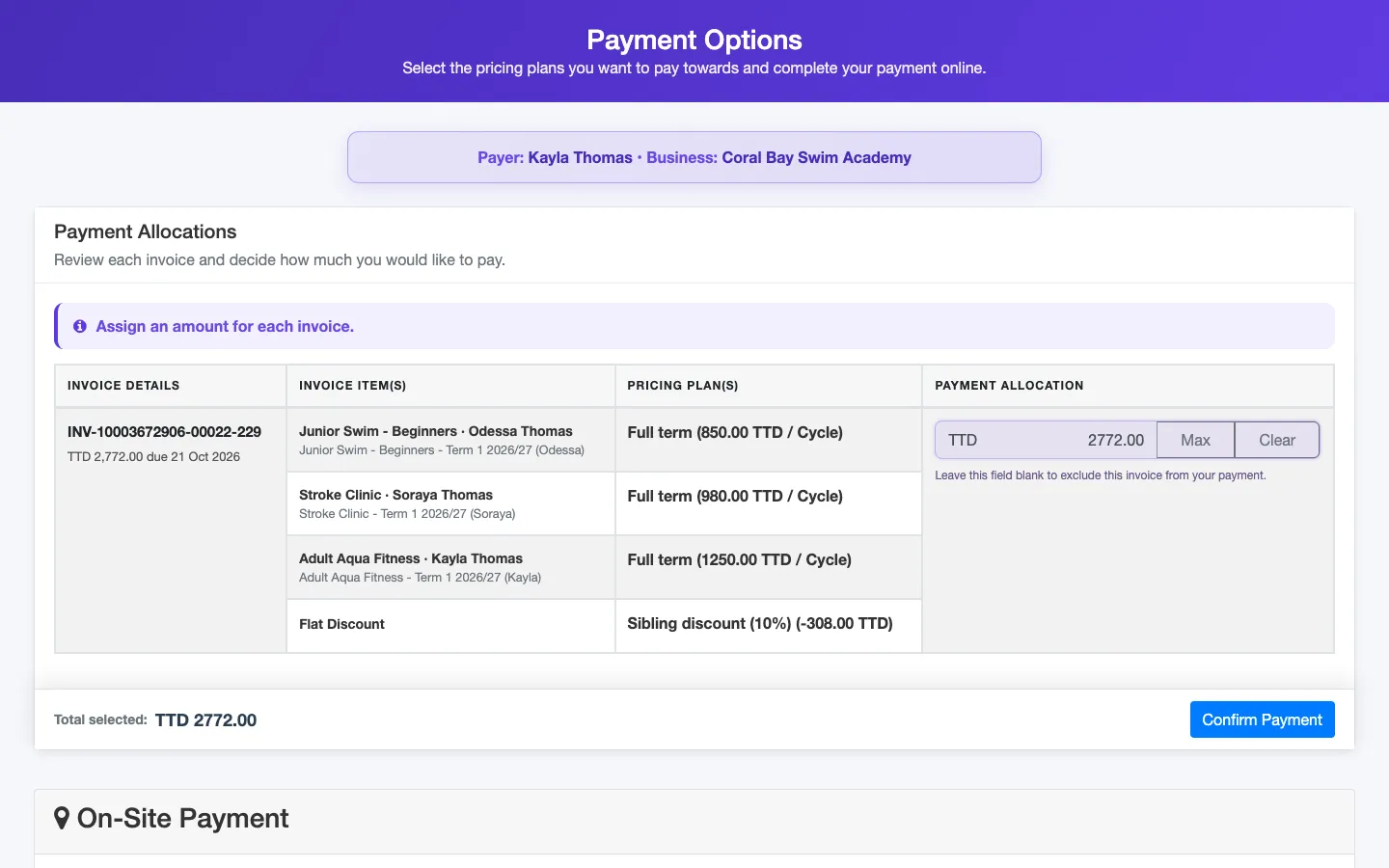
- It is scoped to payment. The link lets someone pay those invoices. It is not a login to the rest of the family's account.
- It expires. By default a link is valid for 30 days, which covers a slow payer coming back across a billing cycle without leaving a forwarded link open forever.
- It is a tamper-checked link. A link with a missing or altered token is refused rather than guessed at.
- It sits beside offline options. If you also use bank transfer, the page shows your bank details and lets the parent upload proof. On-site payment shows your instructions.
For a school collecting TT$900 term fees, that means the invoice, the payment button and the confirmation all live in one message thread instead of three.
Installment plans for tuition that does not fit in one payment
Card rails make it easier to say yes to a payment plan, because every instalment is one tap instead of one more transfer to reconcile. nnerb's invoice editor has a "Split into installments" switch for exactly this.
- You set the number of installments and a date and amount for each. "Split evenly" fills the amounts in for you.
- nnerb checks the plan before it saves: at least two installments, dates in ascending order, and the amounts must add up to the invoice total to the cent. A TT$1,700 invoice cannot carry a TT$1,000 plan by accident.
- The invoice's due date follows the first installment, so aging and late-invoice views read the same dates you promised the family.
- The client portal and app work out what is due from those same installment dates.
Installments are a schedule on the invoice, not a separate billing product. Payments recorded against the invoice, whether online or in person, are applied as usual.
Which plan, and what happens on downgrade
Online payment processing is a Growth feature and up, and the rule is the same for all four rails: setup, the parent's payment page and the moment a charge is created all ask the same question. Installment plans come with invoicing, which is also Growth. Most schools run on Professional, which adds the attendance, progress and messaging tools around it.
Every new business starts with a 30-day trial of the Ultimate plan, then reverts to Starter. Starter keeps bank transfer and on-site payment but has no online card rails. If a business falls below Growth, the online buttons disappear from the payment page immediately and new charges are refused. Anything a parent had already authorised still settles and posts to the ledger.
A setup checklist for one afternoon
- Open your payment setup in the nnerb dashboard and pick the first rail.
- Paste the credentials from your provider's dashboard, and for Stripe or PayPal copy nnerb's webhook address into the provider so payments confirm automatically.
- Keep sandbox mode on for Stripe or PayPal until a test payment goes through, then switch it off.
- Send yourself an invoice, open the payment link on your phone, and pay a small amount.
- Add bank transfer or on-site instructions for the families who will not use a card.
- Turn on payment reminders so the link keeps going out without you.
Once that works, every invoice you send carries a way to pay it. For the bigger picture of invoices, receipts and who owes what, see the financial hub tour, or read how to find kids who are attending but were never invoiced.
Frequently asked questions
Which plan do I need to take card payments online with nnerb?
The Growth plan or higher. One rule covers WiPay, Fygaro, Stripe and PayPal, so you cannot buy one rail on its own. Bank transfer and on-site payment are not plan-gated, so a Starter business can still be paid that way. Every new business starts with a 30-day Ultimate trial, and online payments stop being offered to parents if the business then drops below Growth.
Can I connect more than one of the four rails?
Yes. Each rail has its own settings, and parents see a button for every rail you have switched on, next to bank transfer and on-site instructions if you use those. WiPay, Fygaro, Stripe and PayPal each need their own account with that provider and their own credentials pasted into nnerb.
Can parents pay without logging in?
Yes. The payment link in an invoice email, WhatsApp message or reminder opens a secure payment page for that family's invoices without a login. By default the link stays valid for 30 days, and staff can send a fresh one at any time.
What do WiPay, Fygaro, Stripe and PayPal charge, and how fast does the money arrive?
That is set by each provider and can change, so check their current rates, supported countries and settlement times before you choose. nnerb does not publish or guarantee any of those figures. What nnerb adds is a single payment page for parents and automatic recording of each payment against the invoice.
Put a way to pay on every invoice
Connect WiPay, Fygaro, Stripe or PayPal, send a payment link, and stop matching screenshots to children.
Start your free trialOr see how it works on the Financials page, or compare plans.
