Kids Are Attending but Nobody Invoiced Them: Closing the Term-Start Revenue Leak
If you run a swim school, dance studio, martial arts school, or academy, you know the feeling of looking at the register in week three and realising a handful of children have been attending without ever being invoiced.
The most expensive invoice is the one you forgot to send.
Here is a practical term-start routine for catching those gaps, from invoicing the cycle to registration fees, Pending money and part-period pricing.
How a term starts with children attending and nobody invoiced
It rarely looks like negligence. The week before term, you build the roster, move a few children between groups, and answer parents on WhatsApp. Classes start. Somewhere in that week, the invoices that were supposed to go out on the first day did not.
A few weeks later, you notice. Maybe a parent asks why they never got a bill, or you reconcile the register against payments and the numbers do not match. By then you are asking families to pay for a month they thought was free, and some will quietly decline.
Where revenue slips through at term start:
- A child is enrolled after the first invoice run, so nobody triggers a bill for them
- The registration fee was agreed verbally and never put on an invoice
- The family was offered two price options and the invoice sits unpaid and unforecast
- A child joins or leaves mid-cycle and the invoice is argued over, then dropped
What closes the gap:
- Invoicing the whole cycle in one pass, with a preview
- A standing list of enrolled children with no invoice this month
- Registration fees that live in one place and show up as a to-do
- A pricing rule for part-periods that you can explain to a parent
Step 1: invoice the whole cycle in one pass
The term-start job is "bill everyone in this cycle at the cycle's price." On the Programs page, a cycle's row has an Invoice this cycle button, which opens the invoice screen already pointed at that program and cycle. You can also pick the cycle beside the program yourself.
- The price is pre-filled from the cycle's default price. If the cycle has no default price, the row is flagged in amber so you fill it in instead of sending a blank.
- You see who was already invoiced. People already invoiced for the cycle start unticked, and a summary line reads like "12 people enrolled in Term 3 · 4 already invoiced · 1 cycle unknown · 7 not yet invoiced." Where nnerb cannot tell whether someone was invoiced, it says "unknown" rather than guessing "not invoiced."
- You read the consequence before anything moves. The approval line spells out the result, in the form "Create and send 27 invoices totalling [amount] to 24 households by email." You can edit any row's price or untick a household, then approve and get a receipt.
- Reminders are one click away from the receipt, with a "Turn on payment reminders" button.
- It can be undone while it is safe to. A batch can be voided as long as every invoice in it is unpaid. Once a payment lands, nnerb names the invoices it will not touch.
A batch is one currency by construction, so a mix of TTD and USD programs is invoiced in separate passes rather than being added together.
Step 2: check who is enrolled but not invoiced
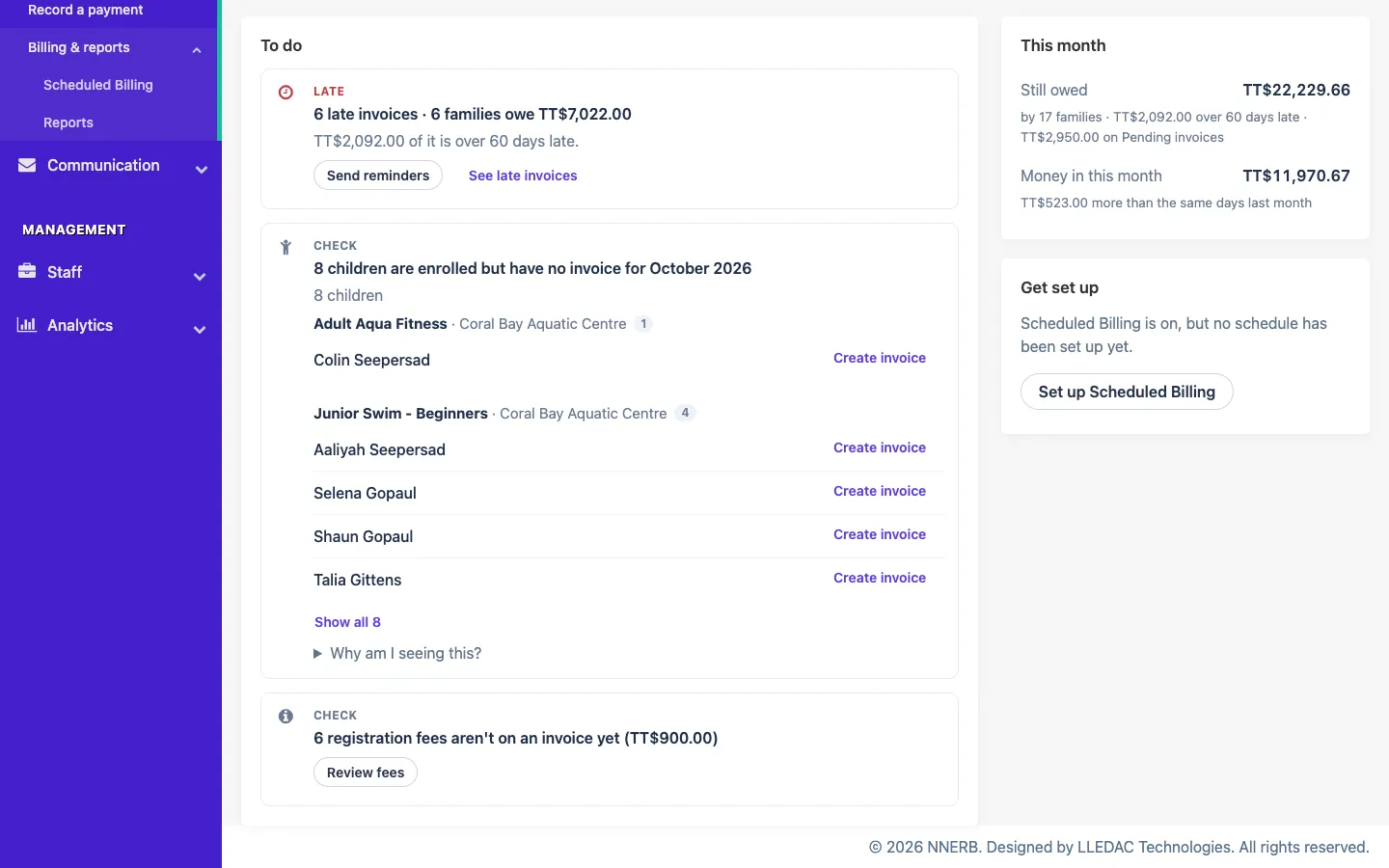
The first pass will not catch everyone, because people enrol after it. The billing Overview page keeps a running check: a card that reads like "3 children are enrolled but have no invoice for October."
The definition is printed on the card so you can trust it: children in a program you bill through nnerb, with classes in that month, and no invoice covering that month. The list is grouped by program (and by location if you run more than one), counts each child once even if they are in two programs, and shows up to 50 names, with a "Show all" control for the rest.
This is the page to open on the first Monday of every month. If the card is not there, you are caught up. If it is, you have a named list to invoice from, using the Create invoice button at the top of the same page.
Step 3: stop forgetting registration fees
Registration fees are the classic leak, because they are small, annual, and different for the second child. nnerb gives them their own home so they stop living in someone's memory.
- One place to define the fee. Choose a name parents will see on the invoice, such as "Registration fee – Maya," and how often it applies: once, every year, or every cycle.
- Siblings are handled. Set separate amounts for the first child, the second and each additional child, plus an optional family maximum.
- The Overview nudges you. It can show "N registration fees aren't on an invoice yet" with the total, "N yearly renewals start by [date]" for renewals starting within 30 days, and "N prices look like registration fees."
- It spots fees hidden in your prices. If an old price is labelled something like "Tuition + Registration," nnerb suggests splitting it into a proper fee. Nothing changes until someone reviews it and chooses to convert or dismiss it.
For a school with 80 families, a TT$150 annual fee missed on a quarter of them is TT$3,000 that was agreed and never billed.
Step 4: see money that is waiting on a choice
Some invoices are Pending: they offer a family more than one price, such as a term fee, a monthly plan, or a discounted early-bird option, and the parent picks when they pay. Until then, the invoice is not a known number, which makes the aging view look healthier than it is.
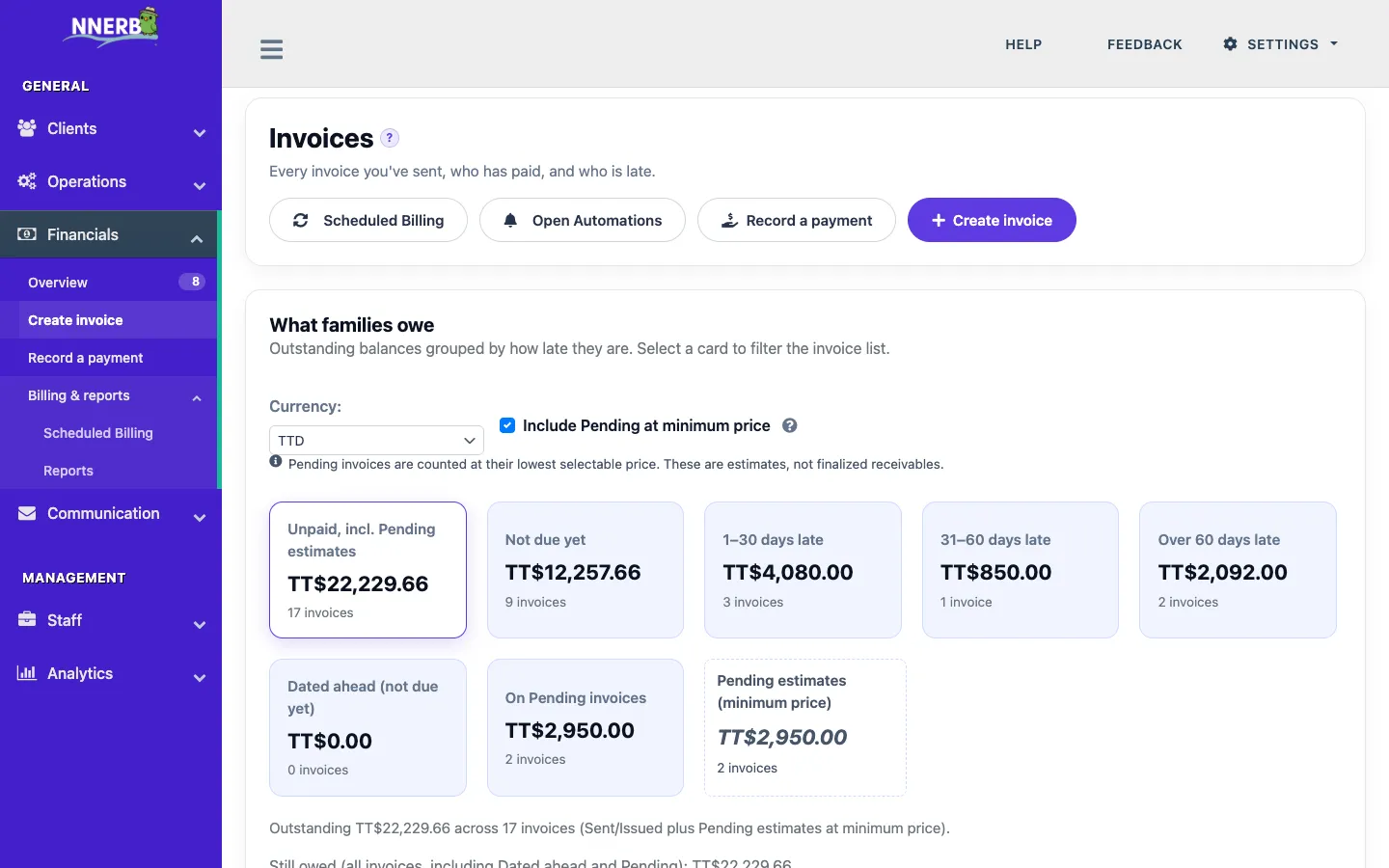
On the invoices page, the aging panel has a switch called Include Pending at minimum price. Turn it on and a separate tile, "Pending estimates (minimum price)," appears beside your normal buckets. It counts the lowest price each Pending invoice offers.
Read it as a floor, not a forecast. The page says so in plain text while the switch is on: these are estimates, not finalized receivables. It is off by default, and Pending money never gets mixed into your late buckets. It is simply a way to see how much is waiting on a family's decision.
Step 5: price part-periods in a way you can explain
The last source of leaks is the disputed part-month. A child starts on the 17th, or leaves after three weeks, and the invoice either overcharges or gets written off.
Each course line on an invoice has a Prorate by choice with three options: follow the pricing type, calendar months, or sessions. The line total states its working in plain words, in the style of "11 of 18 sessions included, billing 2.44 of 4.00 months," so a parent can see how the number was reached.
For recurring invoices, nnerb also prorates the final period. When a term ends, or a child is dropped or completes, the last invoice covers only the days or sessions actually in service. For a monthly line, the rule is days covered divided by days in the cycle. For example, a TT$300 monthly plan anchored on the 10th, with service ending on January 31, bills 22 of 31 days, or TT$212.90. Session and hourly lines bill the attendance actually recorded in the window, capped at what the line normally bills. A period that starts after the child has left produces no invoice.
A first-week-of-term checklist
- Invoice each cycle from the Programs page and read the "not yet invoiced" count before approving.
- Open the billing Overview and clear the "enrolled but no invoice" card by program.
- Review the registration fee to-dos: fees not on an invoice, renewals due, and suggested conversions.
- Check aging with Pending included, so you know what is waiting on a family's choice.
- Turn on payment reminders and make sure parents can pay online from the invoice link.
All of these tools are on the Growth plan and up. Most schools run on Professional, and every new business starts with a 30-day Ultimate trial, then reverts to Starter. Once term is running, the four numbers to check every term show whether enrollment and revenue are actually moving in the right direction.
Frequently asked questions
Which plan do I need for these billing tools?
Growth or higher. Creating invoices, invoicing a whole cycle, the billing Overview, registration fees, Pending aging estimates, proration and recurring invoices all sit on the Growth plan. Most schools choose Professional for the attendance, progress and messaging tools around billing.
Does nnerb check enrollment against invoices for me?
The billing Overview does it for the current month. It lists children who are enrolled in a program you bill through nnerb, have classes that month, and have no invoice covering it, grouped by program. It is a prompt to review, not an automatic charge, and nothing is invoiced until you create and approve the invoices.
Can I charge a registration fee only once, or every year?
Yes. When you add a registration fee you choose how often it applies: once, every year, or every cycle. You can also set different amounts for the first, second and each additional child, and a family maximum so siblings never pay more than a cap.
What happens when a child joins late or leaves mid-term?
Each course line on an invoice has a Prorate by choice: follow the pricing type, calendar months, or sessions. For recurring invoices, the final period is prorated when the term ends or a child is dropped or completes, and no invoice is created for periods that start after the child has left.
Invoice every child from the first day
Invoice a whole cycle, see who was missed, and keep registration fees and part-periods under control.
Start your free trialOr see how it works on the Financials page, or compare plans.
